

Description
Download zzllrr RSS Reader – Chrome Apps, Google Drive, RSS reader, cloud sync
Overview
zzllrr RSS Reader (Cloud Version) is a desktop software designed as a feed aggregator for users seeking to manage and organize online content from multiple sources. The application aims to streamline the process of consuming news, blogs, podcasts, and other web-based updates by consolidating them into a single interface. It is particularly suited for professionals, students, and content consumers who rely on consistent information flow across various digital platforms.
The software is developed by zzllrr, a company focused on productivity tools for digital information management. Although marketed as a cloud-synced solution with integration into Google Drive, the current beta status means that synchronization functionality is inactive. As such, users are advised to install the local version of the application to ensure data integrity and uninterrupted access to their feeds.
Real-world usage scenarios include tracking industry news, monitoring academic publications, or following personal blogs and social media updates. The tool is ideal for individuals who prefer a structured, centralized approach to digital content consumption, especially those who value cross-device access and long-term feed organization.
Key Features & Capabilities
- Feed Aggregation: Collects content from multiple RSS feeds into a unified reading list, reducing the need to visit individual websites.
- Google Drive Integration: Designed to sync user data across devices via Google Drive, enabling access to subscribed feeds from any location.
- Cloud Synchronization (Beta): The feature is currently inactive during the beta phase, with no data being transmitted or stored on cloud servers.
- Desktop Application Interface: Offers a native desktop experience on Windows, Mac, and Linux platforms for seamless access.
- Feed Organization Tools: Allows users to categorize, tag, and filter feeds for improved content discovery and retrieval.
Users can leverage these capabilities to stay updated on dynamic topics without constant manual checking. For example, a researcher might use the app to monitor new publications in their field, while a digital marketer could track competitor blogs and industry trends. The integration with Google Drive, once fully functional, would support users who frequently switch between devices and require consistent access to their reading lists.
User Interface, Workflow & Performance
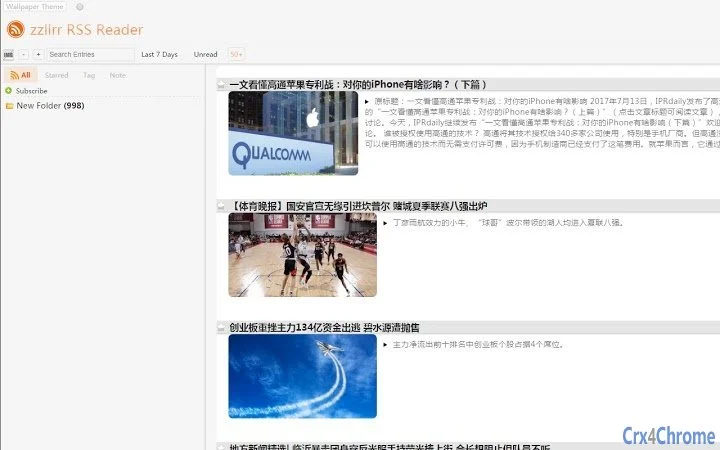
The user interface of zzllrr RSS Reader is designed for clarity and ease of navigation, with a clean layout that prioritizes readability and content access. The main window displays subscribed feeds in a collapsible sidebar, while the central panel presents article previews and full content in a distraction-free format.
Navigation is intuitive, allowing users to switch between feed categories, mark articles as read, save for later, or share content directly. The workflow is streamlined to minimize clicks, supporting efficient content consumption. However, performance details such as CPU or RAM usage were not specified by the developer.
Stability and responsiveness are expected to align with standard desktop application behavior, though exact performance metrics are not available. The developer did not provide additional system requirements or resource usage details. As a result, general software behavior patterns suggest smooth operation on modern systems, provided the device meets baseline specifications for running desktop applications.
Compatibility & System Requirements
zzllrr RSS Reader is compatible with Windows, Mac, and Linux operating systems, making it accessible to a broad user base across different computing environments. The software version is 2.3.1, with an installation size of 150 MB, which is typical for feature-rich desktop applications.
Exact system requirements were not listed by the developer. This includes details about minimum processor speed, RAM, or disk space. As such, users are advised to ensure their system supports standard desktop software execution. Compatibility information was partially provided, and further details may be available in the official documentation or release notes.
Pros and Cons
Pros
- Multi-platform support across Windows, Mac, and Linux
- Intuitive interface designed for efficient content consumption
- Feed organization tools for better content management
- Free to download and use
- Designed with future cloud sync capabilities in mind
Cons
- Cloud synchronization is currently inactive in the beta version
- Missing detailed system requirements and performance data
- Google Drive integration not functional at this time
- Limited information on update frequency and support
- Not recommended for users relying on real-time data synchronization
FAQ Section
Is zzllrr RSS Reader compatible with all major operating systems?
Yes, the software is designed to run on Windows, Mac, and Linux platforms, offering broad compatibility for desktop users.
Is the cloud sync feature currently working?
No, the cloud synchronization feature is currently inactive as the application is in beta. No data is being synchronized to Google Drive at this time.
Can I use zzllrr RSS Reader offline?
Yes, the application supports offline usage. Users can access previously downloaded content without an internet connection.
Is zzllrr RSS Reader safe to download and install?
Yes, the software is free and available from the official source. However, users should ensure they download from trusted channels to avoid third-party modifications.
Does the software require a subscription or payment?
No, zzllrr RSS Reader is currently free to download and use. There are no payment requirements at this time.
Final Thoughts + CTA
zzllrr RSS Reader presents a promising solution for users seeking a centralized platform to manage online content. While the cloud sync feature remains inactive during its beta phase, the core functionality of feed aggregation and organization is intact and well-executed. The application’s multi-platform availability and clean interface make it a strong contender for productivity-focused individuals who rely on consistent content updates.
Despite the current limitations, the software’s foundation is solid, and its future potential is evident. For those who prioritize a free, desktop-based RSS reader with cross-device readiness, the local version remains a viable and functional choice. The developer’s commitment to improving the tool suggests ongoing development and eventual full functionality.
Download zzllrr RSS Reader now
Guides & Tutorials for zzllrr RSS Reader (Cloud) App for Chrome
How to install zzllrr RSS Reader (Cloud) App for Chrome
- Click the Preview / Download button above.
- Once redirected, accept the terms and click Install.
- Wait for the zzllrr RSS Reader (Cloud) App for Chrome download to finish on your device.
How to use zzllrr RSS Reader (Cloud) App for Chrome
This software is primarily used for its core features described above. Open the app after installation to explore its capabilities.
User Reviews for zzllrr RSS Reader (Cloud) App for Chrome 0
No reviews found





